
What is an advanced civil engineering design and the documentation software? It is an Autodesk Civil 3D. And it is widely adopted in transportation engineering, land development, and utility infrastructure.
The key components among these are Toolspace, Panorama, and Object Viewer. It serves as the key analytical, organisational, and visualisation interface.
The Key Components of Autodesk Civil 3D
1. Toolspace: A Centralized Data and Style Management Interface
It functions as the primary management hub in Civil 3D. It helps to provide systematic access to nearly all design objects and the project configurations. The palette is divided into four functional tabs:
- Prospector Tab:
It presents the hierarchical structure of Civil 3D objects. These objects include points, surfaces, alignments, corridors, and pipe networks. It facilitates object navigation, editing, and version control.
- Settings Tab:
It stores object styles, label configurations, and drafting standards. It helps to enable consistency across multidisciplinary teams and long-duration projects.
- Survey Tab:
It supports the integration and management of survey databases and field observations.
- Toolbox Tab:
It provides analytical tools, design reports, and utility functions that are critical for project auditing and documentation.
Proficiency with Toolspace is essential. The studies in CAD-based training environments indicate that learners who acquire early competency in Toolspace exhibit a significant reduction in project setup time and data management errors.
2. Panorama Window: A Data Intensive Tabular Analysis Environment
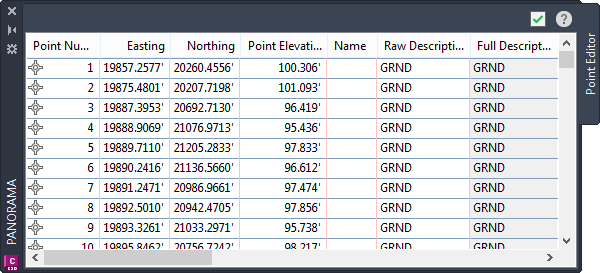
The Panorama window offers a structured, spreadsheet-like interface for the analysis of the object data.
It provides with specialized view for:
- Point group and raw point data
- Surface definitions and breakline controls.
- Pipe network structures and hydraulic attributes
- Corridor section editors and frequency parameters
- Event viewer logs for identifying procedural errors
Because civil engineering projects involve extensive data sets. The panorama interface is indispensable for ensuring data integrity, facilitating bulk edits, and maintaining model precision. In the academic training module, panorama is emphasized as a critical analytical tool due to its role in minimizing modelling inconsistencies and improving the accuracy of design iterations.
3. Object Viewer: A Real-Time Spatial Visualization Environment
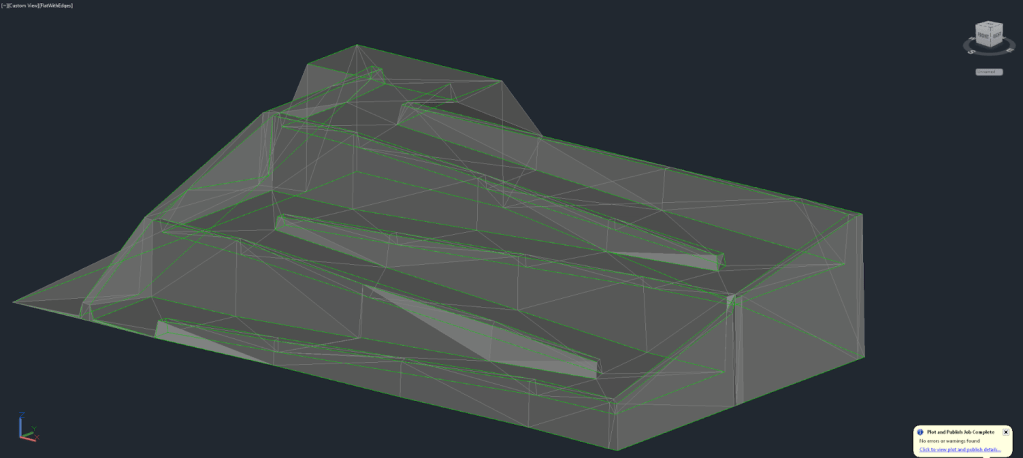
Object Viewer enhances design interpretation by offering high-resolution 3D visualization of Civil 3D objects.
It allows users to orbit, rotate, and inspect surfaces, alignments, pipe networks, and corridors in real time. This visual inspection capability is academically important because it reinforces spatial understanding, an essential competency in civil engineering design.
For the students enrolled in a Civil 3D training course online, Object Viewer provides immediate visual feedback. It enables the learners to connect the theoretical concepts with the software’s geometric behaviour.
Conclusion
A strong conceptual understanding of Toolspace, Panorama, and the Object Viewer serves as the foundation for advanced modelling tasks in Civil 3D. It includes corridor modelling, grading optimization, and the utility design. For the learners seeking professional growth, structured learning through a Civil 3D software certification course ensures the mastery of these essential components. It helps to align their skills with current industry standards.
Contact us today to get started!
 Evaluation Tech